BUSINESS POWERPOINT年中工作计划半年完成情况工作不足之处下步工作计划半年工作概述Professional planners make the structure and copywriting according to the requirements, and express PPT content accurately and efficiently.
CONTENTS半年工作概述半年完成情况工作不足之处下步工作计划 目 录
标题文本预设标题文本预设标题文本预设标题文本预设1半年工作概述
半年工作概述标题文本预设Copy paste fonts. Choose the only option to retain text.标题文本预设Copy paste fonts. Choose the only option to retain text.标题文本预设Copy paste fonts. Choose the only option to retain text.标题文本预设Unified fonts make reading more fluent.Theme color makes PPT more convenient to change.Adjust the spacing to adapt to Chinese typesetting, use the reference line in PPT.
半年工作概述标题文本预设Copy paste fonts. Choose the only option to retain text.标题文本预设Copy paste fonts. Choose the only option to retain text.标题文本预设Copy paste fonts. Choose the only option to retain text.标题文本预设Copy paste fonts. Choose the only option to retain text.标题文本预设Copy paste fonts. Choose the only option to retain text.
标题文本预设标题文本预设标题文本预设标题文本预设•Unified fonts make reading more fluent.Theme color makes PPT more convenient to change.Adjust the spacing to adapt to Chinese typesetting, use the reference line in PPT.− Supporting text here.− You can use the icon library in iSlide (www.islide.cc) to filter and replace existing icon elements with one click.标题文本预设半年工作概述
半年工作概述Supporting text here.When you copy & paste, choose "keep text only" option.标题文本预设Supporting text here.When you copy & paste, choose "keep text only" option.标题文本预设Supporting text here.When you copy & paste, choose "keep text only" option.标题文本预设Supporting text here.When you copy & paste, choose "keep text only" option.标题文本预设
标题文本预设标题文本预设标题文本预设标题文本预设2半年完成情况
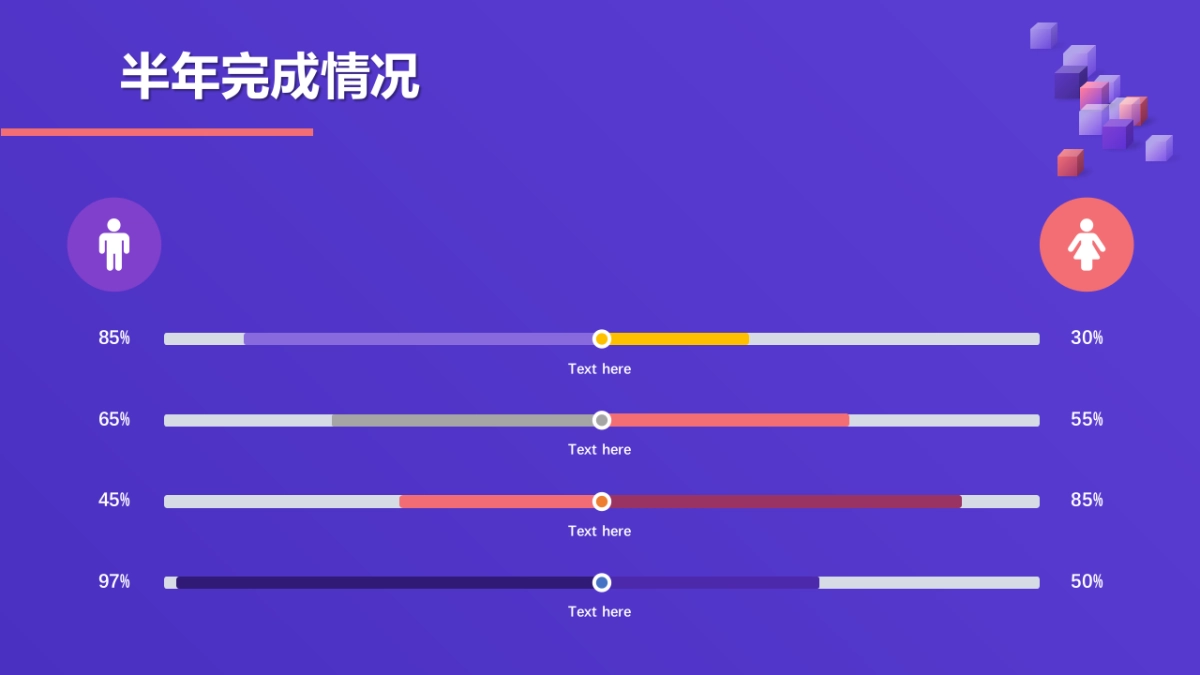
半年完成情况85%65%45%97%30%55%85%50%Text hereText hereText hereText here
半年完成情况Copy paste fonts. Choose the only option to retain text.标题文本预设标题文本预设Copy paste fonts. Choose the only option to retain text.标题文本预设Copy paste fonts. Choose the only option to retain text.标题文本预设Copy paste fonts. Choose the only option to retain text.标题文本预设Copy paste fonts. Choose the only option to retain text.
半年完成情况vCopy paste fonts. Choose the only option to retain text.标题文本预设Copy paste fonts. Choose the only option to retain text.标题文本预设Copy paste fonts. Choose the only option to retain text.标题文本预设Copy paste fonts. Choose the only option to retain text.标题文本预设
半年完成情况35%Copy paste fonts. Choose the only option to retain text.65%Copy paste fonts. Choose the only option to retain text.45%Copy paste fonts. Choose the only option to retain text.12%Copy paste fonts. Choose the only option to retain text.•Supporting text here.•When you copy & paste, choose "keep text only" option.标题文本预设
半年完成情况90%80%70%...